Bearcat CTF 2026 | misc/ghost-ship
My solution to misc/ghost-ship from Bearcat CTF 2026
Setup
misc/ghost-ship is a misc challenge where we are given a single text file containing over 10,000 characters that consist of only >, <, +, -, ., ,, [, and ].
Brainfuck
Some may recognize these symbols as instructions in the Brainfuck programming language, an extremely minimalistic language for which the compiler can be written with only 200 bytes.
The instruction set for the language is as follows:
| Character | Instruction Performed | |||
|---|---|---|---|---|
| > | Increment the data pointer by one (to point to the next cell to the right). | |||
| < | Decrement the data pointer by one (to point to the next cell to the left). Undefined if at 0. | |||
| + | Increment the byte at the data pointer by one modulo 256. | |||
| - | Decrement the byte at the data pointer by one modulo 256. | |||
| . | Output the byte at the data pointer. | |||
| , | Accept one byte of input, storing its value in the byte at the data pointer.[b] | |||
| [ | If the byte at the data pointer is zero, then instead of moving the instruction pointer forward to the next command, jump it forward to the command after the matching ] command. | |||
| ] | If the byte at the data pointer is nonzero, then instead of moving the instruction pointer forward to the next command, jump it back to the command after the matching [ command.[c] |
Executing a brainfuck program can be thought of as manipulating a tape, moving it forward and backward, changing the data by incrementing and decrementing the value at whatever cell we’re currently looking at.
In order to get a little more familiar with the language, let’s look at some toy examples of how basic functionality can be implemented.
Loops
Brainfuck’s built-in loop instructions, [ and ] can be thought of as while (data[pointer_idx] != 0). For example, if we wanted our code to loop 5 times, we could implement the following code:
+++++[ >{other instructions here}<- ]
Breaking this down, suppose our data pointer is at position 0 with a value of 0. We then…
- Increment the cell at position 0, 5 times, so
data[0] = 5 data[0] = 5, which is non-zero, so we enter the loop.>moves the pointer index to the right, so now we havedata[1] = 0- Some work is performed
<moves the pointer index back to the right, so now we havedata[0] = 5again-decrements the data at the current index, sodata[0] = 4data[0] = 4is non-zero, so jump back to the start of the loop and continue
Conditionals
In brainfuck, there is no explicit instruction for conditionals. Instead, the loop operators must be used to check a value for equality with 0. Due to this, fairly significant setup is required for even simple comparisons, such as checking if data[5] == 100. There a variety of ways to implement this, but one example would be the following:
Suppose the pointer is at position 5, and data[5] == 80.
>++++++++++[ >++++++++++<- ]  // load 100 into data[7]
<[ >>-<<- ]  // count down data[5] to 0, decrementing data[7] each time
>[ {handling for data[5] != 100} ]  // enter block only if data[6] != 0, which means data[5] != 100
{rest of the program}
It also must be noted that comparing in this way is destructive as the variable being compared is drained in the process. This can of course be remedied by taking precaution to make a copy of the original value beforehand.
Printing
Let’s saw we wanted to print the string “Hi”. In order to do this, we need to set up our cells to have values equal to the ascii numbers of our desired characters. For example, in order to print the string “Hi”, we could execute the following code:
Suppose the pointer is at position 5, and all values in memory are 0.
+++++++[ >++++++++++<- ]>++>  // load 72 into data[6], move pointer to 7
++++++++++[ >++++++++++<- ]>+++++  // load 105 into data[8]
<<.>>.  // move pointer to 6, print data[6], move pointer to 8, print data[8]
Setting Sail
Although it’s theoretically possible to go through the program on pen and paper, it would be wiser to run the program and see what happens. I ended up using this site to do so, which also has debugger functionality that will be critical later on. This site also has a beautify tool which parses the code into logical lines, so we can get a clearer look at the ghost ship program for the first time.
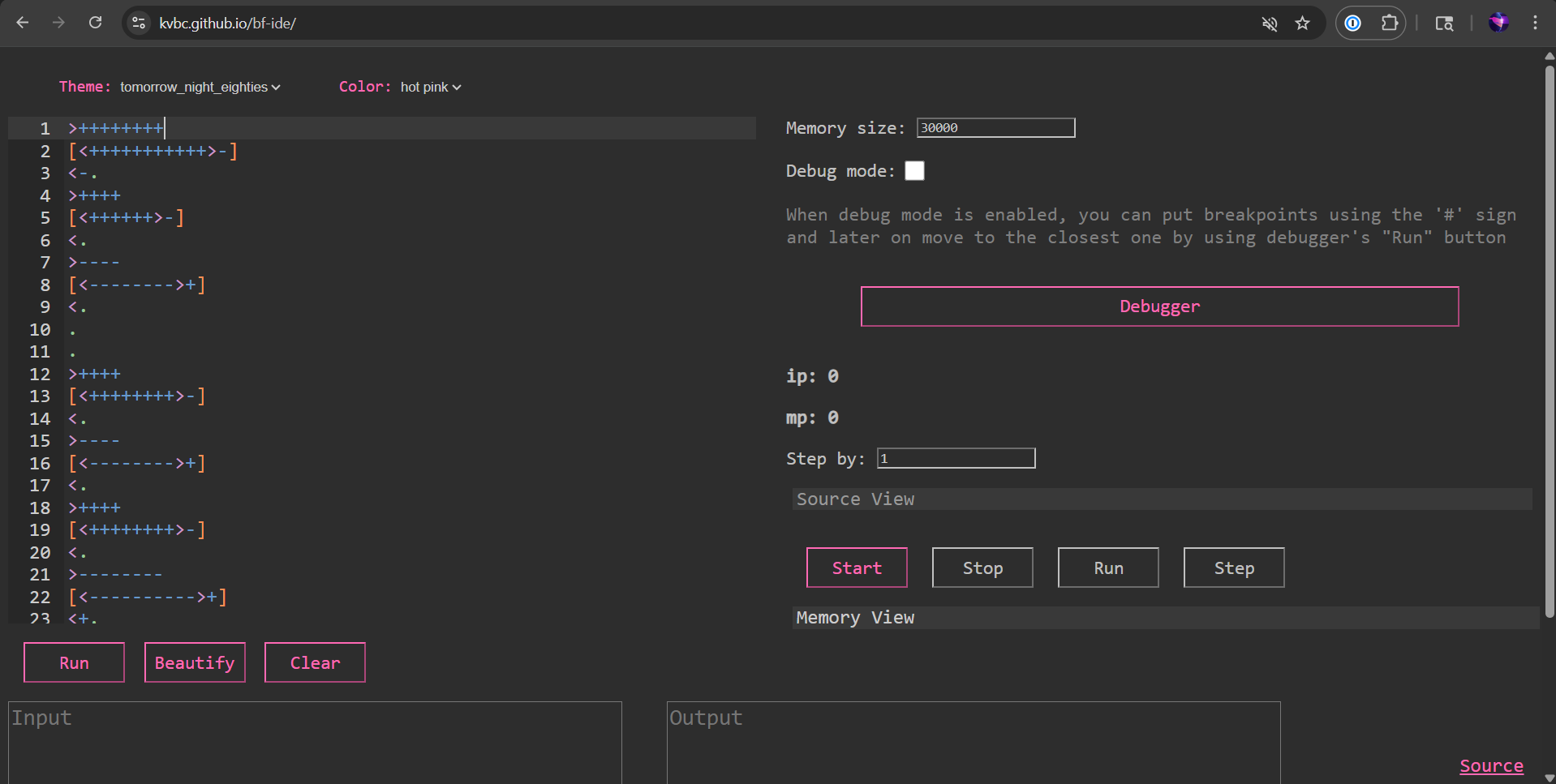
So what happens when we run the program? Well, using the interpreter linked above (as well as most other ones), the program actually hangs forever and doesn’t print anything (we will see why later). However, after trying a few different sites, this one shows us the output we’re looking for (newlines added by me for readability):
WoOOOoOo we are ghOooOoOost pirates and want to haunt yOOoOOoooOu!
The oOoOoOoOOnly thing that woOOOoOoOould make us recOoOonsider is the flag!
Tell it tooOoOoO us:
YooOoOu failed! NooOoOOOOw we will pOOOoOOossess yoOooOOOou!
This output isn’t much to go off of, but it does tell us that the program takes the flag as input, and presumably performs a comparison to check whether our input is correct. This makes it likely that if we can reverse engineer the input verification logic, then we’ll get the flag.
Analyzing The Code
In order to start untangling this mess of a program, we can try and separate it into sections.
First, let’s find where it takes in user input. In brainfuck, one byte of input is taken in when a , instruction is executed. Searching for ,s in the program reveals that 40 bytes of input are taken, and the data pointer is moved right 13 times in between each byte of input. Using the debugger to view the memory tape during this chunk we can tell that each byte is stored at position 1, 14, 27, etc.
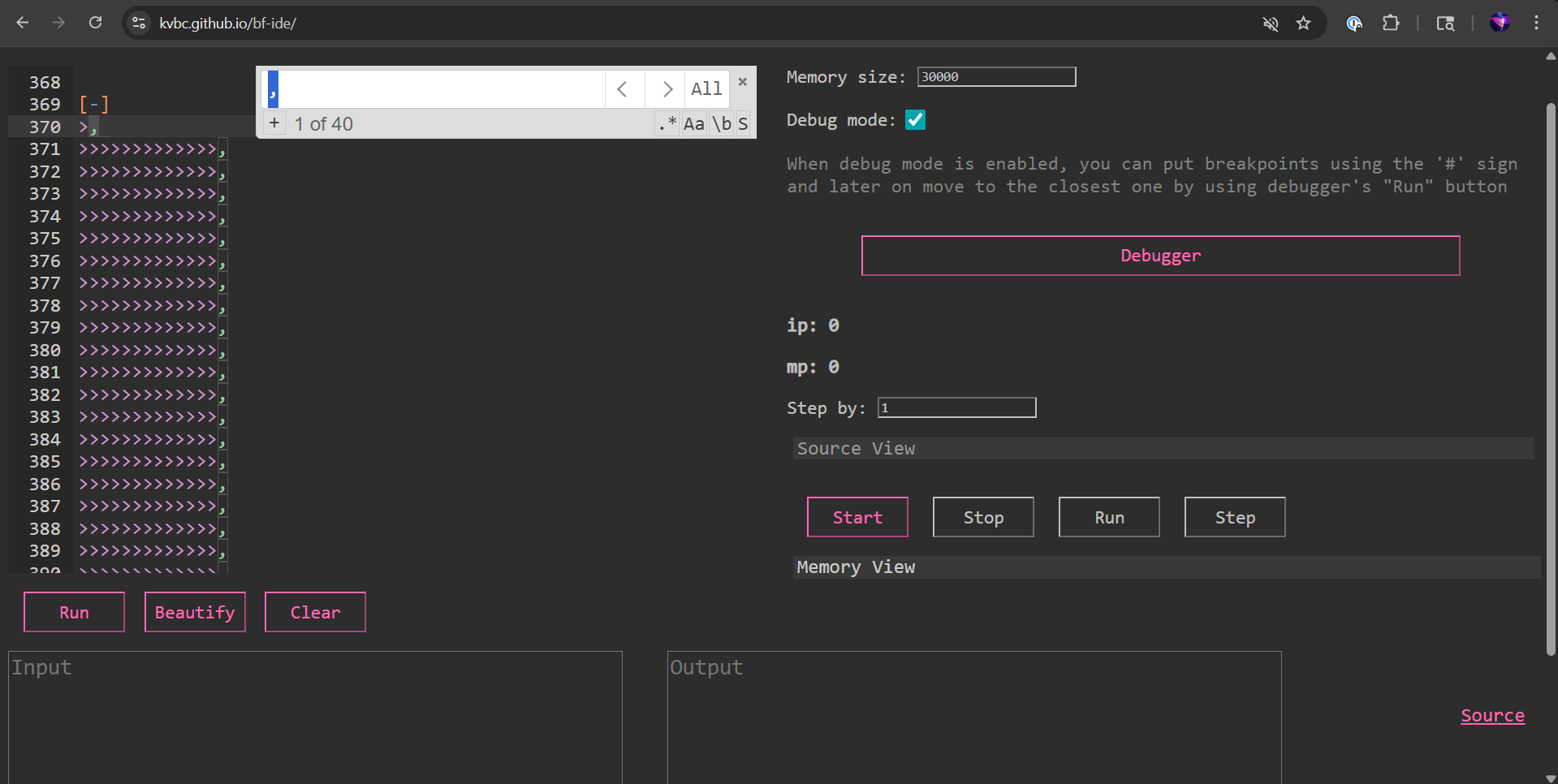
This input handling begins on line 370, with the code before it being used to generate the introductory portion of the output text seen above.
Pressing On
As we look through the code more, we can see that there are roughly 200 lines of fairly simple shift and add commands after the input is taken in.
After that, there is a much more complex nested loop structure that spans around 800 lines.
Immediately following that, there is a conditional containing output instructions that notably ends in an infinite loop [ ]. This is certainly what caused the interpreters to hang previously.
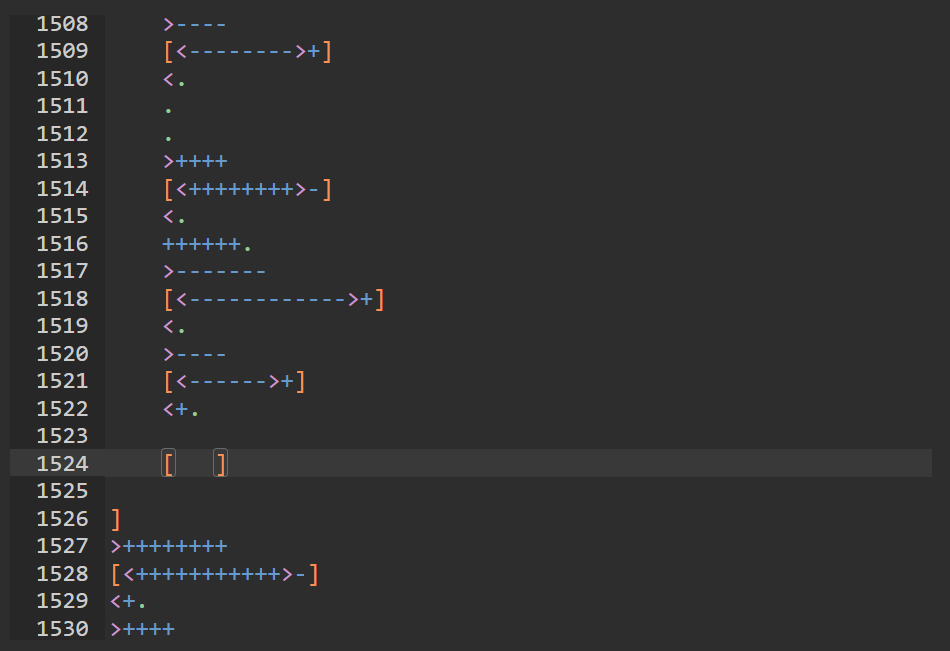
This means that the check for whether or not our input is correct is done in the complex block immediately before the incorrect input handling.
Therefore, the code is split into roughly these sections:
- Introduction
- Input Capture
- ???
- Input Checking
- Incorrect Input Handling
- Correct Input Handling
While it may be possible to manually go through section 4. to understand the logic, let’s see what we can find in section 3.
Ghost In The Machine
By setting some breakpoints (denoted by the # character), we can effectively step through section 3. of the program.
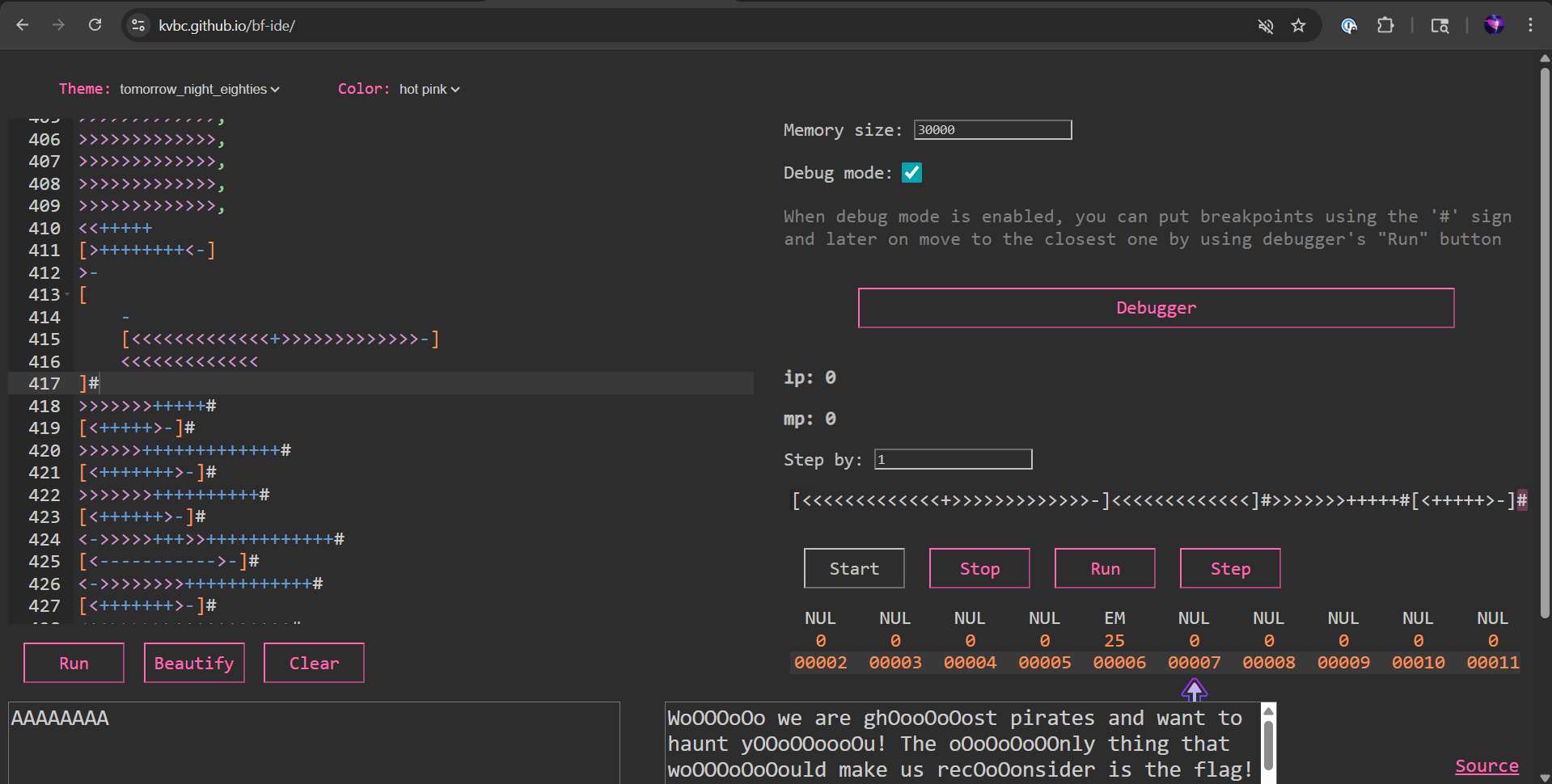
With careful examination, we can start to see a pattern inside each of the 13 cell “blocks” noticed during the input reading (0-12, 13-25, etc.). The value of the input character is stored at position 1, and then loaded into positions 6, 11, and 12 are some values that vary for each block. Notably, the first block only has values at positions 6 and 12.
I tried subtracted these two values, which gave me 91 - 25 = 66, the ascii value for the character B. Since the flag format for Bearcat CTF is BCCTF{...}, this is a great start!
Looking at the next block, the values present are:
block[6]  = 60
block[11] = 124
block[12] = 3
The output value we’re expecting from this block is “C”, so let’s set up an equation:
block[12] - block[6] ? block[11] = 67
3 - 60 ? 124 = 67
-57 ? 124 = 67
In order for this to work, the equation must be:
block[12] - block[6] + block[11] = block[1]
Trying this formula for the first few blocks, we can verify its correctness. Now, all that’s left to do is extract the values for each block and solve!
Pulling Off The Sheet
In order to simplify the task of gathering the block values, I copied the code responsible for loading them into a new program. Then, I added some new lines to step through every value in the data tape so that I could easily read the values in order.
Keeping track of the values in a .txt file, I ended up with the following:
Columns: 1 index, block[6], block[11], block[12]
1   25  0   66
14  60  124 3
27  86  66  87
40  66  64  86
53  75  66  79
66  36  32  127
79  73  72  79
92  11      59
105 4   4   95
118 94  76  127
131 20  4   127
144 71  66  87
157 79  3   127
170 100 68  127
183 106 72  106
196 27  16  63
209 76  68  125
222 22  6   126
235 1   1   55
248 115 49  115
261 120 104 126
274 124 52  126
287 18  51  0
300 81  81  95
313 106 74  110
326 62  48  62
339 87  87  95
352 21  5   93
365 102 32  118
378 66  66  114
391 105 65  109
404 63  31  127
417 53  5   119
430 35  32  107
443 105 32  121
456 9   1   61
469 95  23  127
482 1   1   53
495 42  32  43
508 85  85  125
521 12  5
Finally, we can feed this file into a short python script:
numbers = None
with open("numbers.txt", "r") as f:
	numbers = f.read()

num_array = numbers.split("\n")
flag = ""
for line in num_array:
	data = line.split(" ")
	start_val = int(data[3])
	neg_offset = int(data[1])
	pos_offset = int(data[2])

	value = start_val + pos_offset - neg_offset
	flag += chr(value)

print(flag)
And get our flag:
CTF{N0_moR3_H4un71n6!_N0_M0rE_Gh0575!}
Closing Thoughts
Although I’ve heard about Brainfuck in passing before, I never took the time to understand how it worked. After going through this challenge, I would actually say I like the language! It’s obviously very limited, but having to work through even extremely basic tasks using so few operations makes me appreciate the inner workings of our hardware and software all the more. Thanks so much to Cyber @ UC for hosting Bearcat CTF 2026! I can’t wait to play again next year!